Your priorities as an amateur coder are:
我们作为业余程序员在编程的时候需要优先考虑下面的3点:
- Not breaking anything.不要破坏任何代码
- Keeping your theme updatable.保证主题可升级
- Not making a mess, keeping things readable for yourself or others in future.不要搞的一团糟,保证代码在后续可以让自己或者其他人读得懂。
This entire chapter is about where you can start editing code and what kind of changes you can make, while still keeping these points in mind.
本章的重点是讲述我们怎么开始shopify编程,以及哪些地方可以改动,并且记录我们修改的这些地方。
⚠️ Keeping your theme updateable.
保证主题可以更新。
Updating your theme isn’t always easy in Shopify.
对于shopify来说,保证主题一致更新比较困难。
Key points:
要点:
If you got your theme from the Shopify theme store, you should be able to update automatically.
如果我们是从Shopify主题商店获得的主题,那么我们主题可以自动升级。
How this works:
主题自动更新是怎么工作的呢?
- Shopify adds the latest version of your theme to your store as an unpublished copy. Your current theme isn’t affected.Shopify会在我们店铺里面增加一个最新版本的主题,这个最新主题是一个草稿形式的存在。我们目前的主题也不会受到任何影响。
- Shopify carries across the current themes content and settings to the newer copy of your theme. In other words, all your JSON templates (which contain theme customizer and settings data) are moved to the new theme.Shopify会把我们现有版本的主题的内容和设置转移到最新的主题文件里面。换言之,我们所有的JSON模板(包含主题设置和主题自定义数据)会转移到最新版本的主题。
- Code changes are not carried across to the updated theme!You need to copy and paste code changes across manually. This is why it’s very important to keep them neat and document your changes somewhere.
自行修改后的代码不会同步到已更新的主题!这也是为什么我们需要保 持代码简洁并记录我们所有的修改的重要性。
📌 Quick tips for keeping themes updateable:
保证主题更新的小技巧:
- Keep your CSS separate from your themes CSS. Use the custom CSS field in theme customizer sections where possible.尽量保证我们的CSS和主题CSS分类。尽可能的在主题编辑器的区块里面使用自定义CSS。
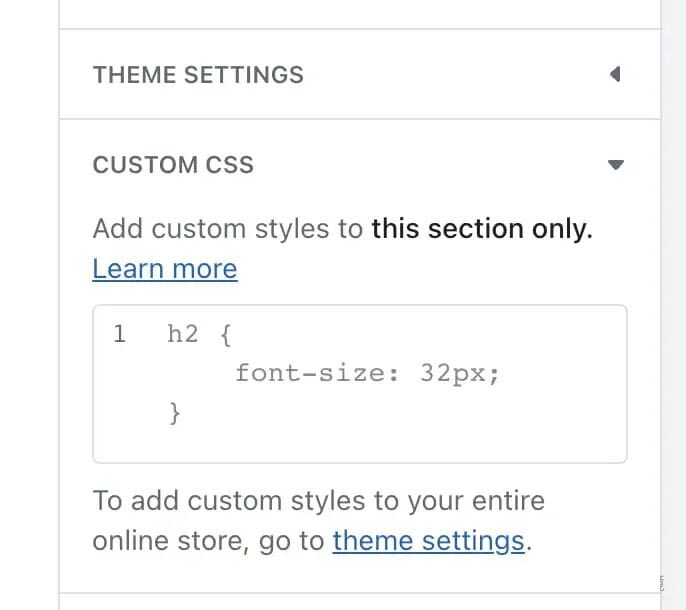
- Use section or snippet files where possible. So your modifications aren’t so interwoven in theme code, but separated and easy to move.尽量用区块和代码段进行代码修改,保证我们的代码修改不会太多的牵扯到原有主题的代码。尽量保持我们修改后的代码独立和容易迁移。
- Document which changes you made so it’s easy to find and move them across. If you have the skills, use version control (Git).我们修改过的文件尽量做记录,保证我们很容易找到并容易迁移。如果我们技术过硬,尽量使用版本控制流程。
And now, in order of maintainability and ease-of-use, here are the places and methods you can use to edit code in Shopify.
现在为了易用和后期容易维护,下面是我们编辑shopify代码的具体实践





