This applies to styling more than content, but it’s part of writing HTML so I’m explaining it here.
虽然这一方面更接近于样式部分,但是我们也在编写HTML这一部分来解释清楚。
In HTML there is a certain default flow. Most elements you put on the page will appear on the next line, below the previous element.
我们在编写HTML的时候有一个默认的流程。我们在页面上写了某些元素,再写其它的时候会自动另起一行。
Inline elements do not follow this rule. They will not go to the next line. Rather they appear to the right of the previous element, just like in normal writing.
但是行内元素就不遵守这个默认流程。它不会自动换行。它们会出现在上一个元素的右边。
Look at this code and the resulting output closely:
我们咨询看下面的HTML代码和输出的前台内容:
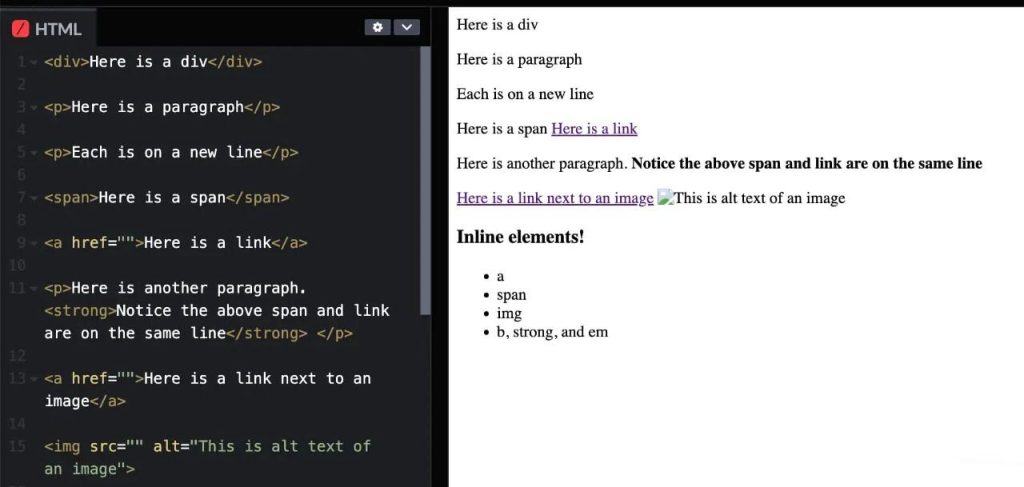
As you can see, some elements are on the next line, but inline elements appear on the same line.
如上图所示,很多元素都是新的另起一行,但是行内元素在同一行内。
Common inline elements:
常见行内元素:
<a><strong>,<b>,<em><span>
We will go deeper into how this affects layout and positioning in the CSS chapter. For now, I just want you to understand how this affects our HTML.
我们会在CSS这一章节里深入讲解这些元素如何营销页面的布局和定位。
When we write HTML, put a block level element on a separate line, and inline in the same line.
当我们写HTML的时候,块级元素单独占据一行,而行内元素可以放在同一行。
Not everyone does this, but it’s very widespread and a good habit.
并不是每个人都会这样做,但这种行为非常普遍,且是一种好习惯。
This doesn’t make any difference in terms of the actual output. It has no effect on the webpage itself. It’s just for us, to make it easier to see and read.
虽然这种做法在实际的输出的页面上没有任何不同,但是这种写法会让代码更加易读易记易识别。
<p>Paragraphs go on a new line</p>

<p>Their opening and closing tag is on the same line</p>

<p>A <a href="">link</a> is inline so I put it on the same line</p>
Here is when you would use the inline <span> rather than <div>:
下面我们就得使用行内元素<span>而非块级元素<div>:
<p>Here is some text and <span style="color: green;">a word</span> that I want to highlight in green</p>
Below is an example of what NOT to do:
下面的案例我们一定不能这么做:
<p>Here is some text and <span style="color: green;">a word</span> that I want to highlight in green</p>
This code is technically correct, but it’s ugly and when I look at this I assume I forgot to add the closing </p> tag on the first line. I might then add it, which would create a bug.
虽然下面的代码在技术上是没有问题的,但是看上去却比较难看,而且在第一行我忘记加结束标签</p>了,如果后面再加上就有可能出现bug。





