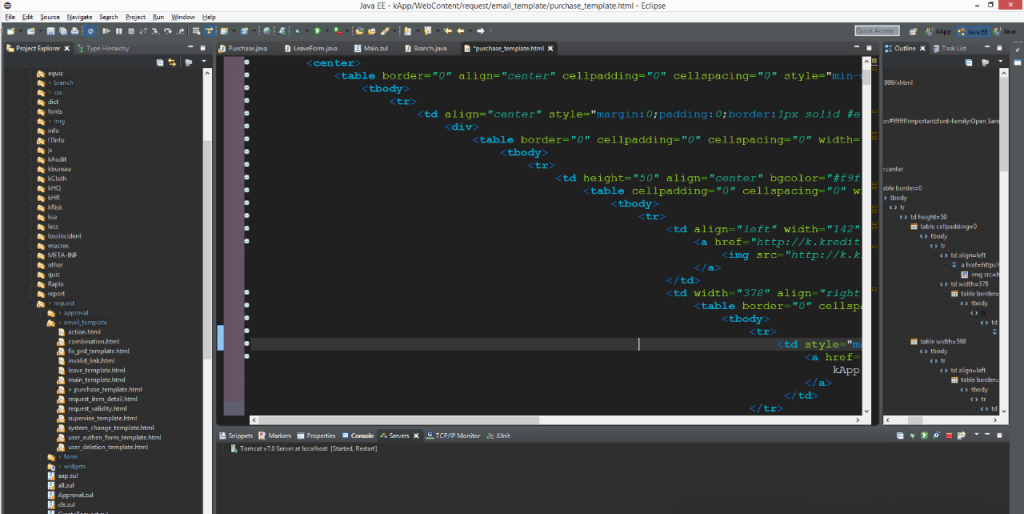
Indendation is something I’m very strict about. It makes your code readable and reduces bugs.
缩进是我们在写代码的时候必须要严格注意的。因为正确的缩进可以让我们的代码更加可读并减少出错的几率。
This is like writing english – you use paragraphs to make your writing readable by others. A wall of text is much harder to read.
这和我们写英语是一样的–我们使用段落来让英语让人更加易读。如果所有单词都糊在一起,那是非常难读的。
In HTML, whenever an element is inside another element, you indent it using the Tab key. The structure of the page becomes immediately visible. To outdent, the shortcut is usually Shift+Tab.
在HTML里面,如果一个元素在另一个元素里面,我们就需要用Tab键来缩进。使用缩进,我们的页面结构会更加合理,代码的可读性也会加强。我们可以使用Shift+Tab来取消缩进。
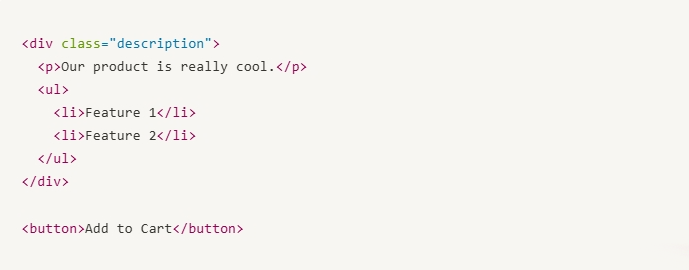
You can also use blank newlines to visually separate different parts of the page.
我们可以另起一行来区分页面上不同的部分。
Here my description code is on every line, nice and compact. But I added a new line between the description and the Add to Cart button, because it’s a different feature – a different thought. It needs to be separated visually.
我上面写的代码就非常清晰美观。大家可以看到我在产品描述和添加购物车按钮中间加了一行。为什么这么做呢,因为这是两个不同的内容,因此需要在视觉上分开。
You can use as many new lines as you need, it’s a matter of preference. This won’t break the HTML.
在编写代码的时候我们建议更多的把不同的内容另起一行来写。这也不会对HTML带来损害。





