JSON isn’t really a programming language. It’s simply a way of holding data, kind of like a table.
JSON并不是一个编程语言,反而更像是一个存储着数据的表格。
In Shopify you will mostly see JSON in two places:
在Shopify里面我们往往在两个地方能看到JSON的出现:
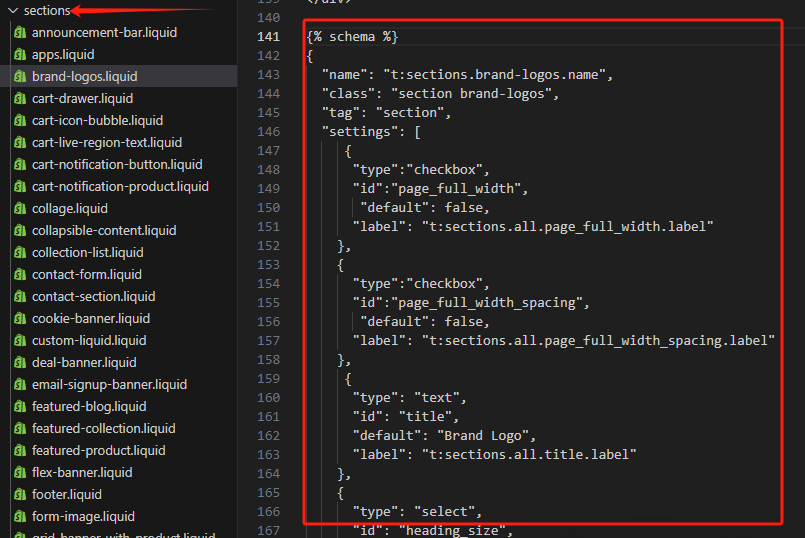
- Section Schema at the bottom of every section file, this json is used to create the settings for the theme customizer.
- 区块纲要 在每一个区块文件的底部都会出现JSON,用于为主题定制器创建设置选项。
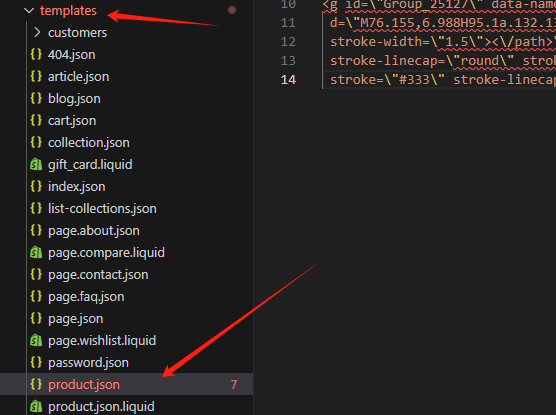
- Template files in the templates folder e.g. product.json. This json records the sections that you added to the template.
· 模板文件 在一些模板文件夹里,比如product.json。JSON存储着我们往模板文件里面添加的区块信息。
Obviously it is also being used in various Javascript files but this isn’t a Shopify specific thing.
当然JSON在很多Javascript文件里也普遍存在。
JSON is quite simple to understand:
JSON非常容易理解:
{

  "name": "John Doe",

  "age": 30,

  "city": "New York",

  "hobbies": [

"reading",

"traveling",

"photography"

],

  "address": {

    "street": "123 Main St",

    "city": "New York",

    "zipCode": "10001"

  }

}
There is always a key and a value.
我们可以看到上面的JSON里面有个键(Key)和值(value)
- The key is always in quotation marks.
- 键(Key)一般都在引号里面。
- The value is only in quotation marks if it is a string or plain text in other words. Numbers don’t usually need quotation marks.
- 值(value) 如果值是字符串(纯文本),就需要用双引号括起来。数字就不需要用双引号。
The value can also be an array (a list), as we see in “hobbies”: [ ] . An array is enclosed in square brackets.
有时候值可以是一个数组(一组数据),就像上面我们看到的“hobbies”: [ ] 。这一组数字就包含在方括号里。
The value can also be another JSON object, as we see with "address": { }, so we just go a level deeper. JSON can be endlessly nested like this.
数值可以是另一个JSON对象,就像我们上面看到的”address”: { },其实这个JSON值更深一级的划分。JSON可以像这样一直无限细分下去。
The only problem with JSON is it’s very strict. If you forget a comma or a bracket somewhere, it will break.
JSON的最大问题就是它比较脆弱,容错率比较低。如果你忘记一个逗号或是一个括号,它就崩溃了。
In Shopify if you’re editing the schema and you see an error saying “Schema could not be saved” it’s often just a comma or bracket somewhere. Double-check your code or undo your last change.
在DIY Shopify的过程中,如果你编辑纲要(schema),并且你看到一个错误提示“纲要(schema)无法保存”往往就是我们漏掉了一个逗号或者是括号。这时候我们就需要重新检查代码或者是回撤到上次修改的位置。
📕资源:
JSON键和值的类型
- 键(Key):必须是字符串,且用双引号括起来。例如:”name”、”age”。
- 值(Value):可以是以下类型之一:
①字符串:用双引号括起来的文本。例如:”John”。
②数值:整数或浮点数。例如:123、45.67。
③布尔值:true 或 false。
④数组:用中括号包围的一系列值。例如:[1, 2, 3]。
⑤对象:用大括号包围的一系列键值对。例如:{“name”: “John”}。
⑥null:表示空值 1 2





