If you read the Intro to CSS a long time ago, you might want to quickly re-read that part to jog your memory.
我们在第一章的时候简单地介绍过关于CSS的知识。我们可以回到前面复习一下。
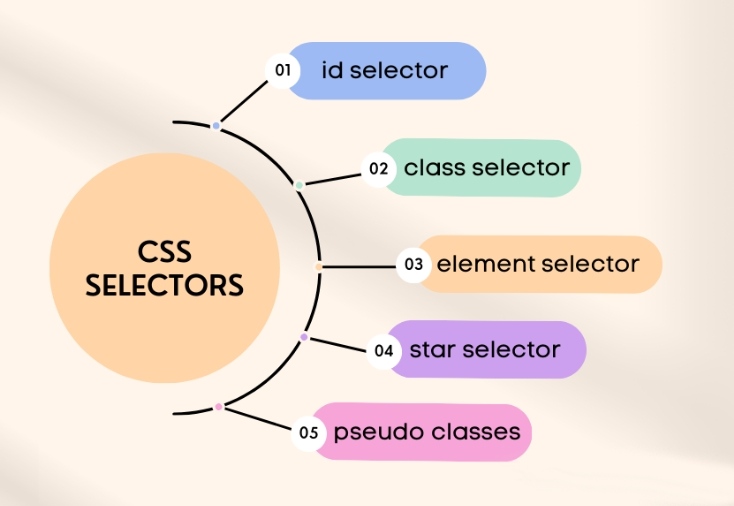
Key points from the intro:
总结一下第一章的一些简单要点:
CSS can be written in different places – it can be inline, embedded, or in a separate file. You will frequently use all 3 methods, depending on the situation.
我们可以在三个地方写CSS样式–行内样式、内嵌样式和单独文件里写。我们可以根据具体情况选择具体使用哪一种。
HTML classes allow you to target an element with CSS. In CSS this is called a selector.
HTML类可以让我们定位CSS的元素。在CSS里面我们称之为选择器。
Anatomy of a CSS block:
CSS块的逻辑:
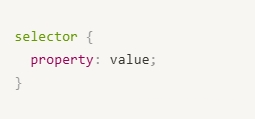
5.1 CSS Selectors
5.1 CSS选择器
There are lots more, but these are the selectors you will commonly see and frequently use to target elements.
选择器有很多,下面是我们常用的一些:
| Selector | What it targets |
| Element names e.g. div , p , h2 etc… | All occurrences of the element on the page |
| div a | All links inside divs |
| div > a | All links inside divs, direct children only |
| .classname | Elements with this class |
| div.classname | A div with a certain class. Slightly more specific than just classnames. |
| #id | Element with this ID |
| div, .column, a, p { } | Targeting multiple different elements at once |
| * | Everything on the page, all elements. Rarely used. |
| .richtext-container * | Everything inside of the richtext container |
| 选择器 | 选择器所定位元素 |
| 元素名称比如 div , p , h2 等 | 页面上的所有元素 |
| div a | divs里面的所有链接 |
| div > a | divs里面的所有链接, 直接作用于子链接 |
| .classname | 与这个类相关的元素 |
| div.classname | div里面的某个具体的的类。比单纯的类目名称更加具体。 |
| #id | 与这个 ID相关的元素 |
| div, .column, a, p { } | 一次性定位多个不同的元素。 |
| * | 页面上的所有元素,这个比较少用到。 |
| .richtext-container * | 在富文本框里的所有元素 |
In 80% of cases you will just use classes to target elements. The other ways are listed just because you might see them used in theme code.
在实际工作中,有80%的几率我们只使用类来定位元素。之所以列出其它的一些CSS 定位器是因为我们有可能会用到。
There are lots of other selectors and clever ways to combine them, and you don’t have to remember them all.
我们没有必要全部记住这些选择器,在实际的工作中我们有很多方式可以有机的结合他们。
If you ever see a selector you don’t understand, just Google “CSS selectors” to find a full list.
如果我们碰到过没有遇到的选择器,那么我们可以谷歌一下加以了解。





