📗 English grammar: 我们把网页开发的三大语言类比成英语语法
HTML is the noun. In HTML we tell the browser “this is a link”.
HTML是名词。我们可以用HTML语言告诉浏览器“这是一个链接”
CSS is the adjective. It describes the look. So in CSS, we describe the link as blue and bold, and underlined.
CSS是形容词。CSS规定了网页的外观。因此我们可以规定这个链接的样式、是否加粗或是有没有下划线等样式。
Javascript is the verb. In Javascript, we can open a pop-up when the link is clicked. In other words, it does something in reaction to an event.
Javascript是动词。在Javascript里,我们可以设置当点击链接的时候弹出弹窗。简单的讲Javascript是与某个事件相关的交互。
1.1 HTML is the structure
1.1 HTML是骨架
HTML describes the structure of our page. It is usually contained in .html files, but in Shopify they use the .liquid extension.
HTML决定了网页的基础结构。我们网页一般是以.html格式命名,但是在shopify里面我们以.liquid作为后缀,如下图所示。
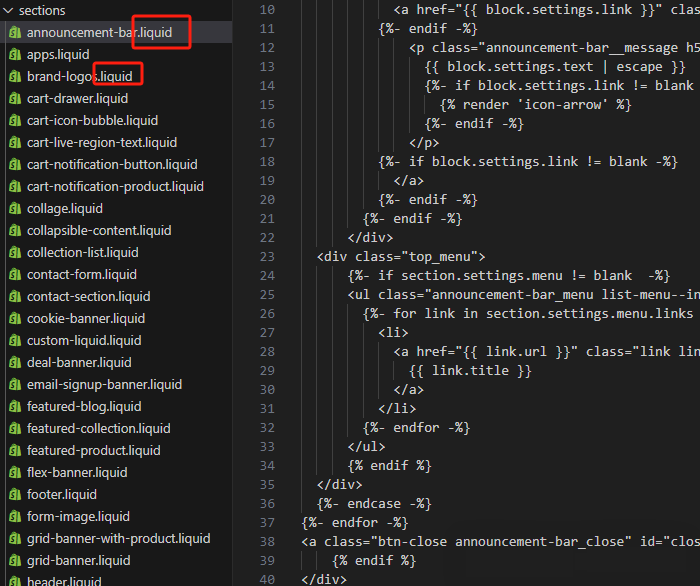
HTML Elements are usually written with two tags surrounding the content. The opening tag is written with two angle brackets e.g. <h1> and the closing tag has a slash e.g. </h1>.
HTML元素里的内容一般位于两个<标签>(开始标签)</标签>(结束标签)尖括号之间。例如<h1>这是一个标题</h1>。我们可以看到内容 “这是一个标题”就位于开始标签<h1>和结束标签</h1>之间。
For example, in the below code we tell the browser that we want:
例如:下面的标签告诉浏览器需要输出什么内容
- a heading (
<h1>) - 标题 (<h1>)
- a subheading (
<h2>) - 二级标题 (<h2>)
- a paragraph with a link (
<p>for paragraph and<a>for link) - 带有链接的段落 (<p> 是段落标签 <a> 是链接标签)
- a list of bullet points (
<ul>for unordered list, and<li>for list item) - 列表 (<ul> 是无序列表, <li> 有序列表),(这种一般用于独立站菜单)
- an image (
<img>) - 图片标签 (<img>)
这些标签的表现方式可以看下面的案例:
<h1>Patagonia R1 Hoody</h1>
<h2>Warm, stretch, and breathability</h2>

<p><a href="<https://shop.com/pages/size-chart>">Click here</a>to check our Patagonia size chart.</p>
<ul>
  <li>Feature 1</li>
  <li>Feature 2</li>
  <li>Feature 3</li>
</ul>

<img src="<https://cdn.shopify.com/s/files/1/0567/4526/3300/products/kurtka-patagonia-r1-techface-hoody-classic-navy-02.jpg?v=1658743620&width=990>" alt="Patagonia hoody">
Closing tags: Notice the image doesn’t have a closing tag. Some elements don’t need it. That’s because there is no actualtext content for it to wrap.
结束标签:我们可以注意到图片是没有结束标签的。HTML里有些元素是没有结束标签的,因为他们没有实际的内容需要包含。
Attributes
属性
HTML elements can have attributes. These are written as
attribute=”value” and always go inside of the opening tag.
HTML元素可以有属性。一般这样来写attribute=”value” 一般位于开始标签的内部。
In the link above we have the href=”” attribute, which is
where you put the url you want to link to.
在链接里我们有一个链接属性href=”” ,在这里我们可以放入想要链接到的URL地址。
The image element has the src=”” attribute, which is where
you put the image url, and the alt=”” attribute, which is optional,
and it’s for text that describes the image for Google and
other bots, and for people with disabilities (blindness), and
shows a small label in case the image fails to load.
图片元素有个src=””属性,在这里我们放置图片的URL。alt=”” 是个可选项,这个
选项是对于图片的描述,可以告诉谷歌等搜索引擎这个图片是关于什么的。
对于一些视力障碍者来说,读屏软件可以读出ALT属性里面的内容。
如果我们网页图片加载失败,ALT属性也会给出提示。
Classes and ID’s
类和ID选择器
class=”” and id=”” are probably the most commonly used attributes
in HTML.
class=”” and id=”” 是HTML里最常用的两个属性。
They allow you to give a name to an element, so you can describe
what it’s for.
我们可以使用它们给HTML的元素命名。这一点是非常重要的。在CSS和javascript
里面我们也会用到它们。
Classes also allow you to target that element with your CSS.
More on this in the CSS section below.
在CSS里面我们可以使用Classes来定位某个元素,如下所示:
<h1 class="product-title">Supercool product</h1>
<button class="product-form-submit">Add to Cart</button>





